
Answer “where do we stand?” the same day
Cash, receivables, payables, stock value, and open orders come from the same posted documents, so month-end stops being a reconstruction exercise.
SAP Business One
When accounts, purchasing, sales, and stores work in separate systems, everyday questions take too long to answer. SAP Business One brings these core processes together for small and midsize businesses, with multi-currency, multi-warehouse, and batch control built in. LITPL implements and supports it for companies across Africa and India.
For manufacturers, traders, exporters, and logistics businesses across Africa and India
+91 99070 36906 · WhatsApp works from any country
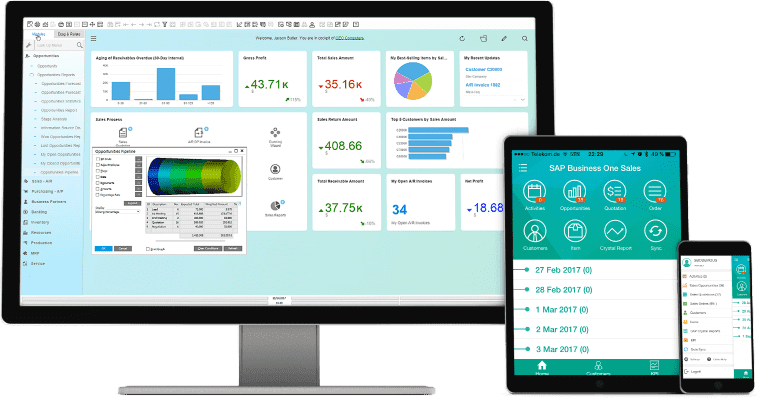
What changes for your business
One system for finance, purchasing, stock, sales, and reporting, implemented by a partner that works in your hours, wherever in Africa or India your business runs.
Cash, receivables, payables, stock value, and open orders come from the same posted documents, so month-end stops being a reconstruction exercise.
Goods receipts, transfers, issues, and deliveries update inventory by warehouse and batch as they happen, with costing that follows the movement.
Buy in one currency, sell in another, and report in your local currency. Exchange differences and revaluations post automatically.
Approval procedures, user authorisations, and document numbering keep growing teams and multiple locations working to the same rules.
What it covers
One database for finance, purchasing, sales, inventory, production, and reporting. Each area below is standard functionality; LITPL configures it to your documents and adds only what your operation needs.
General ledger, cost centres, budgets, banking, and fixed assets, posted automatically from every business document.
Purchase requests, orders, goods receipts, landed costs, and supplier invoices, matched before payment.
Quotations, orders, deliveries, invoices, and receipts, with credit limits and price lists per customer.
Stock by warehouse, bin, batch, or serial number, with transfers, counts, and valuation that follow each movement.
Bills of materials, production orders, material issue, output, and wastage, with cost per unit visible per order.
Service contracts, calls, and scheduled invoices for businesses that bill on a cycle rather than per shipment.
Standard and custom reports, dashboards, and alerts on live data, so management sees the business the same day.
Extend the standard system where the operation needs it: ICD Management for depots, weighbridges, barcode scanners, banks, and e-invoicing portals.
An example workflow
Capture purchasing and sales activity alongside the customer, supplier, and item records.
Follow inventory movements and financial transactions within the same business system.
Use reporting and analytics to understand business performance and investigate exceptions.
The sequence, approvals, and handovers are adapted to your operation during discovery.
Industries

Edible oil manufacturing
From receipt to packed oil

Cement manufacturing
Materials, production & dispatch

Steel manufacturing
Grades, sizes & material movement

Food processing
Ingredients to finished packs

Commodity trading & export
Sourcing, grading & shipment

Mining & quarrying
Extraction, haulage & dispatch

Depot and containers
ICD and CFS

Storage & warehousing services
Customer stock, space & storage charges

Agriculture & agribusiness
Inputs, harvest & trading
Decisions we agree in discovery
These are answered with your documents before a proposal is written, so the quote reflects your business rather than a generic package.
Number of legal entities, local and reporting currencies, and whether intercompany transactions are needed.
VAT or GST, withholding tax, and the country-specific reports your accountants and regulators expect. Localisation options are confirmed for your country.
How many named users, which roles, and how many warehouses, plants, or branches are in the first phase.
Items, business partners, chart of accounts, opening balances, and open documents. We provide templates and review the data with you before loading.
Weighbridges, barcode scanners, e-invoicing portals, banks, payroll, or an add-on such as ICD Management. Each is scoped with sample data first.
The management reports you actually use, agreed before configuration so the data model supports them.
How LITPL implements it
Proposals show licences, services, and support separately, in the currency you contract in.
Planning for standardised cloud processes across several entities?
SAP S/4HANA Public Cloud may fit better when you want SAP-managed upgrades and standard best-practice processes across a larger group.
Compare with SAP S/4HANA Public Cloud ↗Hosting, delivery, and support
SAP Business One can run on a cloud server in a region near your users or on your own server. We help you choose based on connectivity, IT staffing, backup, and remote-support needs.
Discovery, configuration, training, and support run over video calls, screen sharing, and WhatsApp in a working window that overlaps your day. On-site visits are arranged for go-live or plant and yard walkthroughs when they add value.
WhatsApp is the fastest channel. Email and phone are answered Monday to Saturday in the agreed window; extended support windows are agreed per project.
Working hours in your time zone and the full delivery model are on the Where we work page.
Questions buyers ask
Start with the processes that create the most manual work. Review your industry requirements, reporting needs, existing data, and integrations with LITPL. Confirm which requirements use standard functionality and which require an add-on or additional configuration.
It is designed for small and midsize businesses, typically from a handful of users up to a few hundred. The right question is whether your processes need connected finance, stock, and sales records; if you are reconciling spreadsheets every month, it usually is.
SAP provides localisations for many countries, and generic tax configuration covers most VAT and withholding requirements elsewhere. We confirm the approach for your country during discovery, before the proposal.
A first phase covering finance, purchasing, sales, and inventory for one company usually takes a few months, driven mostly by data readiness and the availability of your key users. We agree the timeline after discovery.
No. Cloud hosting removes most server work, and LITPL provides functional and technical support remotely. A named internal coordinator who knows the business is more important than an IT department.
Licences are per user and depend on the licence type; implementation depends on scope. We prepare a written proposal in the currency you contract in after discovery, with licences, services, and support shown separately.
Next step
Bring examples of your sales orders, purchase documents, inventory reports, and month-end reporting needs.
Working with businesses across Africa and India, with remote delivery and on-site visits when the project needs them.